
Popular content
- Switching from Linux for main OS on Drupal development laptop (387,716)
- Drupal SEO Modules (350,357)
- Tracking Redirects with Google Analytics (282,291)
- Drupal Pathauto URL Aliases Settings (230,519)
- Drupal Node Teaser SEO (215,812)
- 503 HTTP Status Code when Site Down (192,652)
- Drupal 7 Localization and the Commerce module (178,921)
- Drupal Actions and Triggers (177,627)
- How to setup a Drupal LAMP development environment on Linux (Ubuntu) (172,535)
- Drupal misadventures configuring Private Message + Views + DBTNG (171,112)
Recent Blog Posts

Drupal Meta Tags (nodewords) Module for SEO
I setup Drupal on kristen.org a couple weeks ago. I intentionally set it up with the base installation and didn't add any 3rd party modules. The reason being that I set up this site to show how you can add in various Drupal modules and configure Drupal for SEO (search engine optimization).
Thus far, I've done very little SEO on the site besides the first 5 steps in my Basic SEO Top 10 list for a few blog posts and articles. The only extra module I did add in the is Drupal Google Analytics module for tracking purposes.
Now I need to start doing the Drupal SEO configuration. For today, I'll add in the Drupal metatags (nodewords) module so that we can work on step 9 in the Basic SEO Top 10 list and add our Drupal meta tags.
- Download Drupal metatags (nodewords) module
- Unzip nodewords tar file
- Ftp nodewords directory/files
- Enable nodewords module
- Edit content and add meta text
- I just installed and tried out fireftp
and it works great. Put the directory in sites/all/modules.
- Shown as Meta Tags
- You'll see a "Meta Tags" section when
you edit your content now.
For example, I edited my Basic SEO Top 10 web page and added a description and some keywords in the drupal Meta Tags section. In order to see these, go to that page and do a "view source" and look for "meta". I did add some keywords in but these aren't typically very useful for the big search engines so don't spend much time on those. Do make sure not to use the same keywords too much in either the description or the keywords section or it will be considered spam.
Here's an example of the search result before I did the Drupal meta tags:
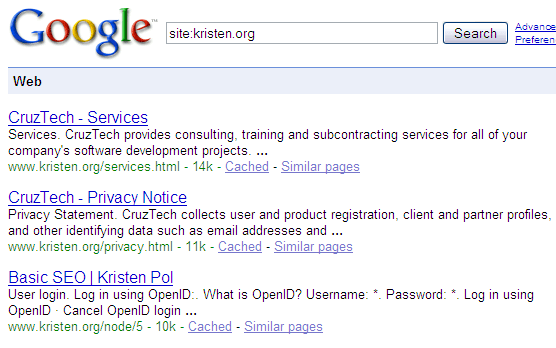
Once Google has re-indexed the page, I'll add in an image of the new search result.
Now you can easily add the Drupal meta tags (nodewords) module to your site and start adding your own drupal meta tags for the best SEO.
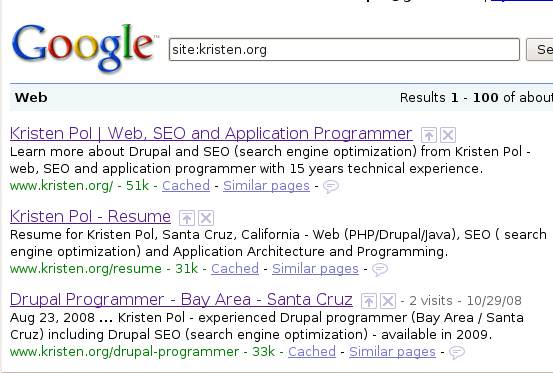
Here's what the metatags look like now:
- kristen's blog
- 144285 reads


This is a featured content block that has been configured to show blog nodes with terms SEO or Drupal SEO by the author kristen. It shows random list of 20 results in the block and 30 results on the more page.
- Make Drupal SEO Friendly
- Drupal Has Multiple h1 Tags
- Drupal Pathauto Module
- Fix Duplicate Content with Global Redirect Module
- Drupal SEO Modules
- HTML Validation: Free HTML Validator Tools
- 503 HTTP Status Code when Site Down
- Drupal Pathauto URL Aliases Settings
- Drupal Nofollow Link Sculpting
- Free SEO Tools
- Kristen
- BADCamp Drupal SEO Presentation 2009
- Free Google Keyword Research Tool
- Drupal Node Teaser SEO
- Basic SEO Top 10
- Drupal SEO Reviews

Comments
Edit meta tags not appearing on node edit.
Hi,
I followed the instructions correctly, however i could not see the meta tags fields while I am editing a node as authenticated user. I could see meta tag fields as administrator but not as registered member.
I have given permissions to authenticated users to edit meta tags for keywords and description, but could not get them while node edit. I have all custom content types.
please help me.
Content type settings
For each content type, you have to make sure to check the checkbox:
"Allow editing of meta tags"
on the content type settings form, e.g.
http://[domain]/admin/content/node-type/forum
Cheers,
Kristen
nodewords
hell.o there dudes!
first of all, excuse my bad english.. :)
I have installed nodewords 6.x-1.11, but it doesn't seem to be working, neither on the front page, or the others. In the view source win. browser I can't see any of my meta-tags, but in my admin area (for ex. the node edit form) they are saved.. any ideas why? 10x
Nodewords issue queue
Sorry for the delay. If you are having problems with a particular drupal module, you should go to the drupal.org project page for that module and look through the issue queue. If you don't find your issue, then you can add one of your own.
The nodewords issue queue is here: https://www.drupal.org/project/issues/nodewords?categories=All
Good luck,
Kristen
nodewords (Node Canonical URL)
Kristen,
I have a questions about the Node Canonical URL. According the text under the box, it says to "Use a relative URL without the initial slash"
The reason I'm asking is all the pages listed on Woopra are just showing the relative link and I'm hoping that is not what Google is indexing.
Can you clarify the entry for this? Is this how you're using it? I really wnat to be sure before I change over 200 nodes....
Thanks,
Bob
Sounds right
I haven't used that feature in the newer version of nodewords on a live site, but your assumption seems correct. I just tried playing with it right now with the dev version of nodewords but it won't let me save the meta tags for custom pages for some reason, so I can't check it.
What I would do is:
1) add it to canonical url to meta tags for one custom page
2) save
3) go to that page
4) view source
5) search for <link rel="canonical" in header
6) make sure the link looks correct (it will prepend the base path)
If so, then you should be fine to update all the pages.
Btw, here's some general info on canonical URLs:
https://webmasters.googleblog.com/2009/02/specify-your-canonical.html
Good luck,
Kristen
It's Working
Kristen,
I followed your instructions and it appears to be working correctly with no problems. The full URL is showing up in the header.
Also, I don't know if it was just a coincidence, but Google has indexed almost 30 more links since I did this and I have 5 more links with Clickthroughs.
Thanks for the help.
Bob
A very important explanation (for stupid guys)
Hi,
Maybe because i'm a french stupid guy, i didn't see the meta tags work on my site!
I cried, I cried and I cried and it wasn't work...
After a long week end, working on it and before i decided to jump from the "tour eiffel", i found that the meta tags on my node aren't influent on the front page because i have to write the meta tags of the front page on a special path:
/admin/content/nodewords/meta-tags/frontpage
now it works !
i hope my input may help someone...
Good distinction
You are not stupid ;) There is a distinction between adding meta tags to node pages vs. non-node pages.
With the node page, it is obvious because the node edit form has the meta tags fields on it. With non-node pages, you have to go through the meta tags interface (or for old versions use the nodewords by path module) and configure them by the path or by "front".
Thanks for taking the time to write this up because I'm sure it will help someone.
Kristen